








Easily adding data to objects
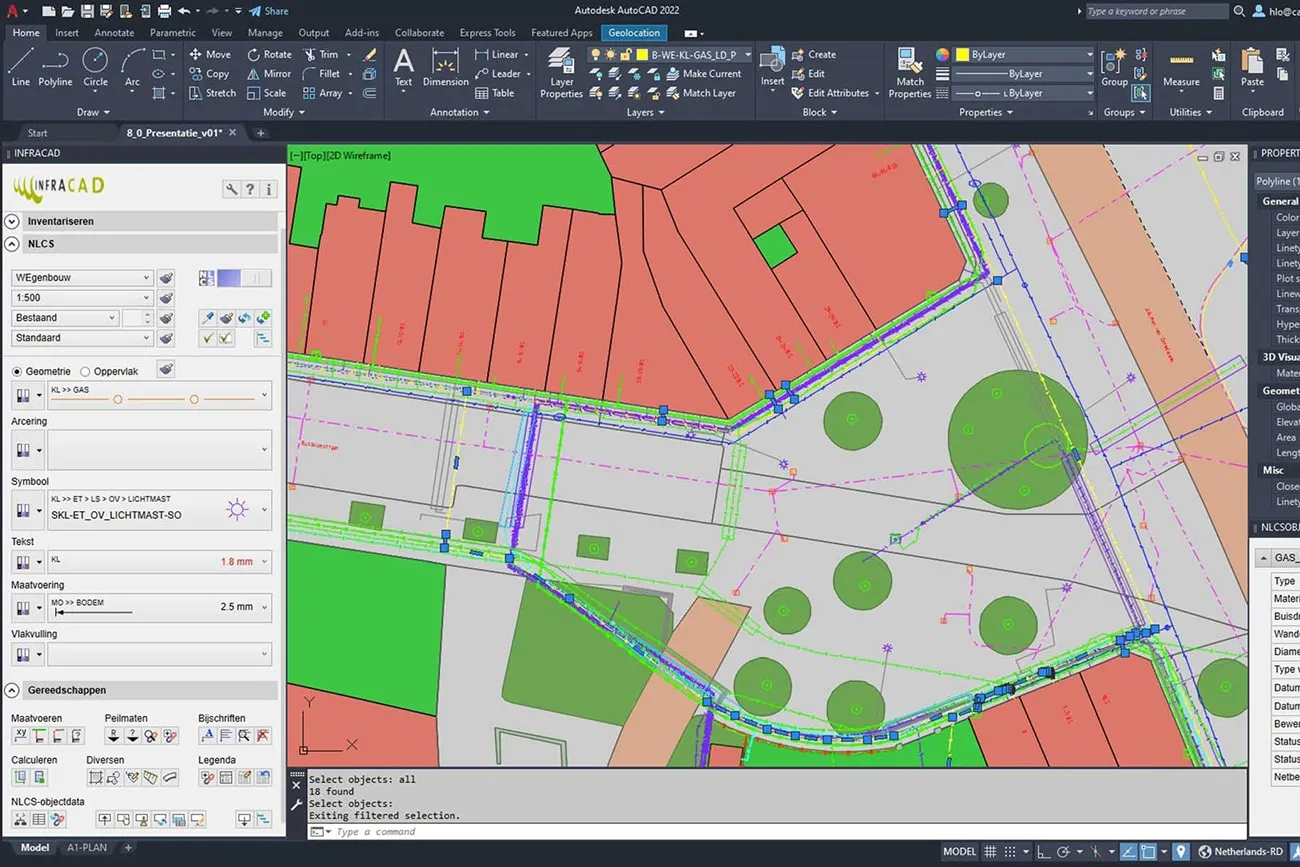
InfraCAD 8.0 is now available. The NLCS application is once again significantly faster, and a large number of tools have been improved. But the most notable additions are access to NLCS Library 5.0, NLCS object data and the Entity Data Viewer. This new NLCS functionality makes it possible to add and manage data for NLCS objects. With this, InfraCAD is clearly targeting future developments.
Working groups are hard at work preparing the NLCS for the future by agreeing with utility network operators on matters including the inclusion of data in the NLCS library and how it can be exchanged. The aim is to ensure effective links with data sources such as BGT, Klic notifications and GWSW, as well as GIS applications.
NLCS object data
Meanwhile, the developers at Arkance Systems have been busy. With NLCS object data, InfraCAD 8.0 now offers a fully integrated application within the NLCS module, allowing data tables to be added to entities directly in a drawing.
NLCS object data is similar to Object Data in AutoCAD Map 3D or Property Sets in Autodesk Civil 3D. The key difference with InfraCAD, however, is that the defined tables can be linked directly to NLCS objects. All table definitions and table links are stored in the NLCS library.
Another major advantage is that AutoCAD Map 3D or Civil 3D is not required. AutoCAD alone is enough for InfraCAD 8.0 to store all object data, along with the table definitions, in an NLCS drawing and read it back at high speed. Any drop-down lists used when entering data are also retained in the drawing.
InfraCAD’s dialogue boxes have been optimised for defining tables and linking them to NLCS objects. Data can be added to the drawing and managed easily using the NLCS module’s drawing tools and the tools on the NLCS object data toolbar. Each table field can be edited quickly in the properties window.
Preferences and Positions
Preferences let you preset field values, for example for a specific symbol.
When drawing, this preference data is added to the new entity. Another useful feature is the ability to define Positions, which include field values in the layer name. When an entity is drawn or its associated data is changed, a layer name tailored to that data is generated immediately, including properties such as the colour and linetype of the corresponding NLCS object.
Exchange format
The working groups are developing an exchange format for this data. InfraCAD now has all the functionality needed to import data from and export data to data files, which can be exchanged with third parties alongside the drawing. This also makes the data available to applications that cannot read it directly from the drawing.
Entity Data Viewer
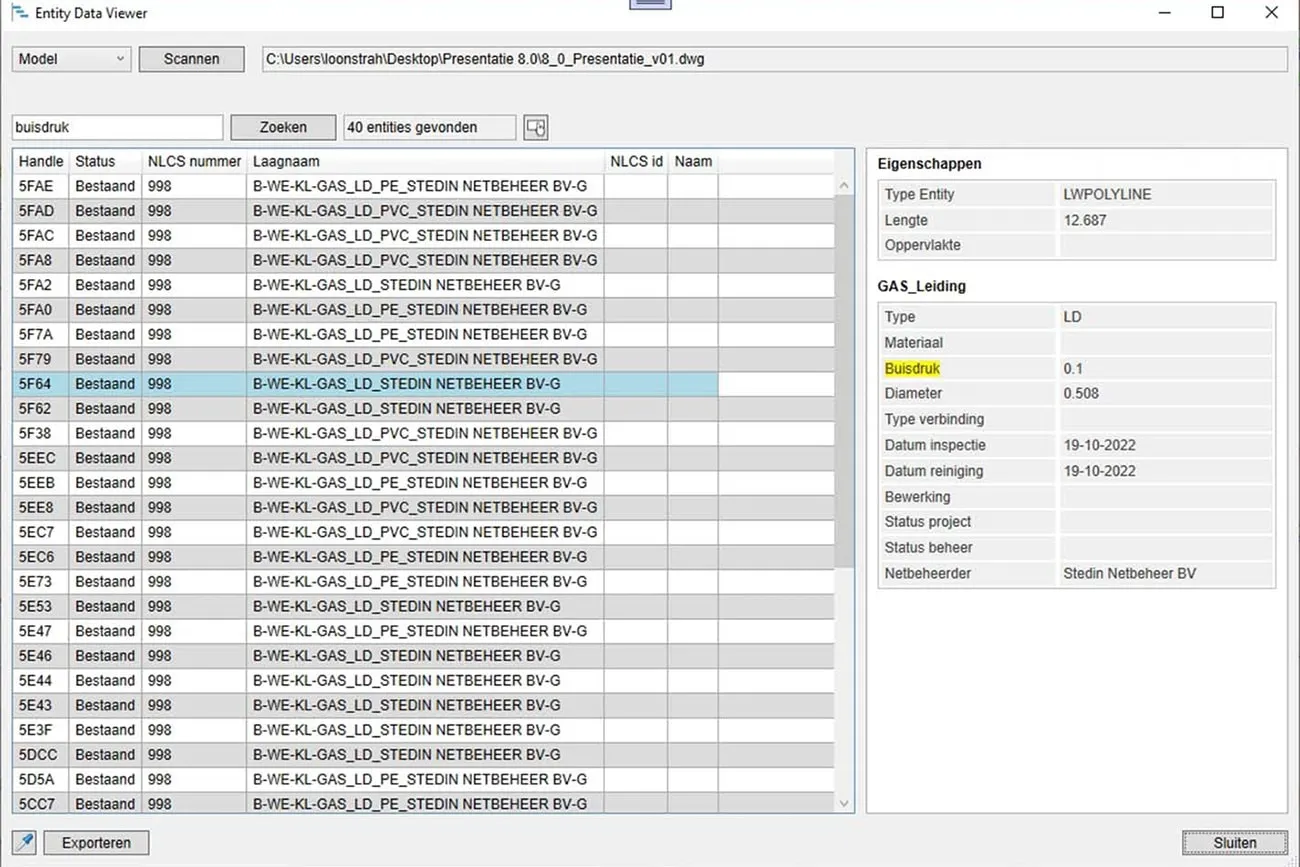
In addition to the NLCS Object Viewer, InfraCAD now also includes the Entity Data Viewer. This new feature provides an overview of all the unique data for each entity in the drawing. Searching this data makes it easy to find specific entities.
All data, or a selection of it, can also be exported to a file. Examples include length, area, data from Attributes and Dynamic Properties, as well as all NLCS object data. The exported file is ideal for importing into ERP software and estimating programmes, where the data can be turned into valuable information.
Applications
The NLCS library does not yet contain NLCS object data. However, InfraCAD offers everything needed to make the most of data. For example, a project library for public lighting (OV) can easily be assembled, with tables containing information such as manufacturer, luminaire type and phase connection.
Alternatively, a project library for planting plans can include all the required symbols and geometry, along with a table of tree or plant characteristics such as Latin name, flower colour, flowering period, height and quantity.
NLCS 5.0
NLCS Library 5.0 is now available with InfraCAD 8.0, incorporating major changes from the previous version. Alignment with BGT and GWSW, as well as a reorganisation of the main groups, has resulted in many NLCS objects being added, moved or removed. Many hatch and linetype names have also changed. Henk Loonstra, developer at Arkance Systems, explains: “These are good improvements, but users have been somewhat surprised by the number of changes. InfraCAD’s existing NLCS Check and Repair function, however, provides a useful tool for easily upgrading existing NLCS drawings.”
The changes may also affect the User Library. InfraCAD therefore now offers the option of displaying a migration report when converting this library, showing changes that may have an impact. Handy!
New licensing mechanism
InfraCAD’s licence management has also undergone a major modernisation. From InfraCAD 8.0 onwards, all InfraCAD Suite applications will use Arkance Systems’ new cloud-based Holixa licensing mechanism. Loonstra says: “Holixa offers our customers some great benefits. They can use all the applications with a single login and manage their own licences. And because the licences are managed in the cloud, working from home or on site is much easier. Both named-user and concurrent-user licences are still available.” Arkance Systems has now begun migrating customers to the new licensing system.
About Arkance Systems
Arkance Systems helps organisations with their digital transition by improving processes, optimising value-chain collaboration and promoting data-driven processes. It serves the construction, infrastructure and manufacturing sectors. To support this, Arkance Systems develops its own IP and offers software, hardware, services and training. Arkance Systems aims to build strategic partnerships and applies its international expertise to local solutions.
A business enquiry for Arkance Systems Nederland? Get in touch
Companies in this story

Keep following this
Get an email when a new story is published. No account needed.
- SubjectSurveying & geo-ICT
- CompanyArkance Systems Nederland