








New KLIC milestone for BlindGuide
The coronavirus outbreak affects us all and calls for flexibility and creativity. In this digital age, we have reached another important milestone in BlindGuide’s start-up journey. And what a milestone: from today, you can also submit a KLIC notification quickly and easily using your laptop, smartphone or tablet.
From the very beginning, when we published the first version of the BlindGuide KLIC app in March 2018, our philosophy has been: make it simple and accessible to view a KLIC notification on site.
KLIC notification
In the years since then, we have regularly come across people who do not have easy access to submitting a KLIC notification. To address this and stay true to our philosophy, we have been working hard recently to add this functionality to the BlindGuide ETL Portal.
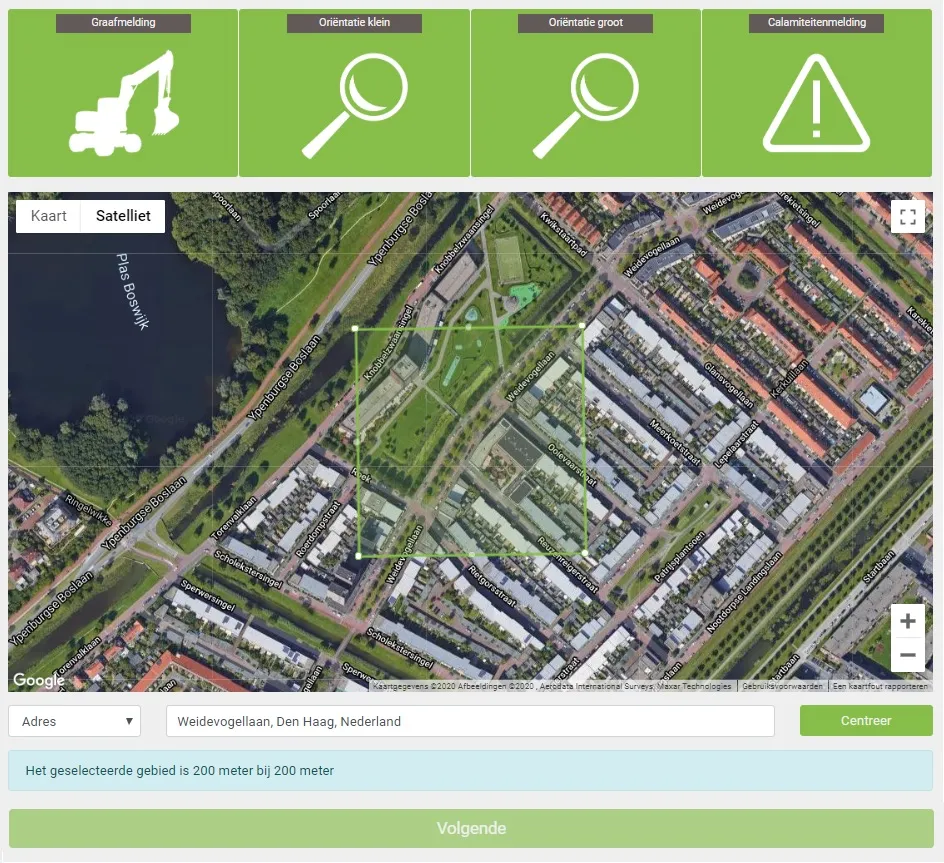
On 17 March, the day finally arrived and we were able to celebrate this milestone. From that day, our customers have been able to submit a KLIC notification easily using a tablet, smartphone or laptop. During the ordering process, you can also easily add your own data, so that the teams on site have all the information they need to prevent excavation damage.
Vector data
Based on the WIBON and the European INSPIRE Directive, Kadaster launched the KLIC-WIN programme together with the excavation sector. This updated vector data is intended to make things easier for excavation contractors. In practice, this means that the “old” PNG images in KLIC notifications have been replaced with vector data. Kadaster and the network operators began this process on 1 January 2019. In the weekend of 1 March, we carried out the final migration test together with several service providers and Kadaster. On Sunday morning, we were able to confirm together that the migration to version 2.2 (fully vector-based data) had been successful. This did not require major changes for BlindGuide, as we had already launched the first vector viewer on the market on 1 November.
Why use BlindGuide?
The benefits of submitting a KLIC notification via the BlindGuide portal include:
- Easy-to-use interface for PC and smartphone;
- Easily add your own DWG or DXF drawing during the ordering process;
- Easily add your own project schedule or work instructions in PDF format during the ordering process;
- Option to add ground-penetrating radar data;
- Pay as You Go;
- View the end result directly in augmented reality in our app.
https://gww-bouw.nl/wp-content/uploads/2020/04/ezgif.com-resize.mp4
Timeline
Of course, we have not been idle between March 2018 and today, and have added many other useful and exciting features to the BlindGuide KLIC app and ETL portal. In the video below, we have summarised the key milestones for you.
https://gww-bouw.nl/wp-content/uploads/2020/04/ezgif.com-resize-kopie.mp4
Een zakelijke vraag aan BlindGuide? Get in touch
Companies in this story
Keep following this
Get an email when a new story is published. No account needed.
- SubjectBouwMat
- CompanyBlindGuide